📵 Ready for usernames!
Web
WhatsApp is changing how some of your contacts show up, and we've been quietly getting Polser ready for it. This release also makes template buttons visible wherever you send them, and marks a contact's button tap so it's never confused with a typed reply.
No number, no problem
WhatsApp is rolling out usernames as an alternative to phone numbers, and the platform has started informing users about it across Europe. In practice, this means some of your contacts may soon reach you without a phone number attached at all, identified only by the username they've chosen on WhatsApp.
We've spent the last couple of months making sure Polser handles this correctly behind the scenes. When a message comes in from a contact using a username instead of a phone number, it lands in your inbox like any other conversation. You can read it, reply to it, and manage it exactly as before, nothing changes on your end. If that contact's phone number becomes available to us later on, we recognize it's the same person and merge the conversation instead of creating a duplicate.
This is a significant shift on WhatsApp's side, and we expect it to keep evolving. We'll continue improving how we handle and surface this information as the rollout continues.
Buttons, seen. Replies, understood.
Until now, Polser's inbox didn't reliably show the buttons on a template message, even though your contact always saw them correctly on their end. That's fixed.
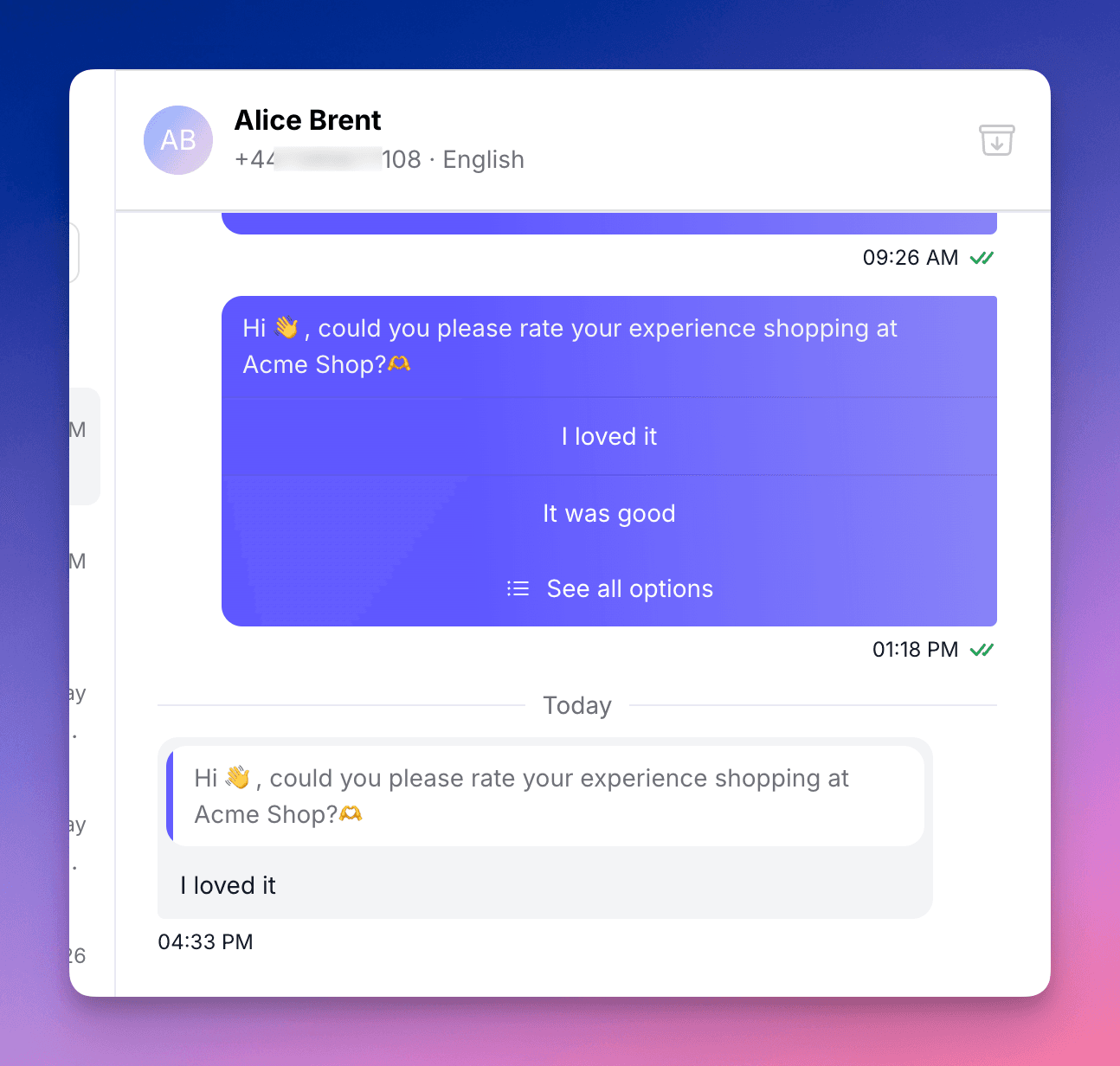
Quick-reply, website, and call buttons now render consistently in the inbox, no matter which of the four ways the template was sent: from the composer, a broadcast, a new chat, or through the API or a HubSpot workflow. Website and call buttons are clickable directly from the inbox.
We also added a small but useful signal: when a contact taps a quick-reply button, it now shows with a distinct visual marker, so your agents can tell at a glance whether someone tapped a button or typed a reply themselves.
And while we were in there, we fixed the broadcast preview so it finally matches what WhatsApp actually shows: proper line breaks, buttons, styled links, and a longer preview before it truncates.
New in your dashboard: message composition
Your dashboard now shows a breakdown of your messaging mix: the split between free-form and template messages, and where your template sends are coming from (broadcasts, new chats, expired chats, or API calls). One more way to understand how your team and systems are using WhatsApp.
Meta has announced upcoming changes to WhatsApp message pricing, though actual rates aren't published yet. Nothing changes today, but when the real pricing is out, you’ll be able to anticipate what it means for your account based on the messaging mix you see here now.
🔧 Other improvements
Custom button payloads via the API. API customers sending WhatsApp templates can now attach a custom payload string to each quick-reply button at send time. When a contact taps it, your webhook receives that payload, not just the button label, so routing logic no longer has to mirror template copy.
Translation for the rest of us: you can now track when someone clicks a button in one of your templates, not just get the button text. That's what makes something like auto-unsubscribing a contact who taps "Stop contacting me" reliable to build.
Safer bulk contact deletion. "Delete failed contacts" on a broadcast now only removes contacts whose messages failed specifically because the number is undeliverable, not everyone who failed for any reason.
👷 Coming up next
We are working on enabling automatic personalisation of broadcast variables with each recipient’s first name, as well as allowing customers to create broadcast templates directly from Polser without needing to access Meta’s admin.
We are WhatsApp specialists!

Polser
Why don't we continue this conversation there?