💬 Inbox management
Web & Mobile
In this release we’ve redesigned how you navigate your inbox with a cleaner, scalable filter system, and introduced a highly requested feature: the ability to filter and browse your archived conversations directly from the inbox.
Redesigned inbox filters
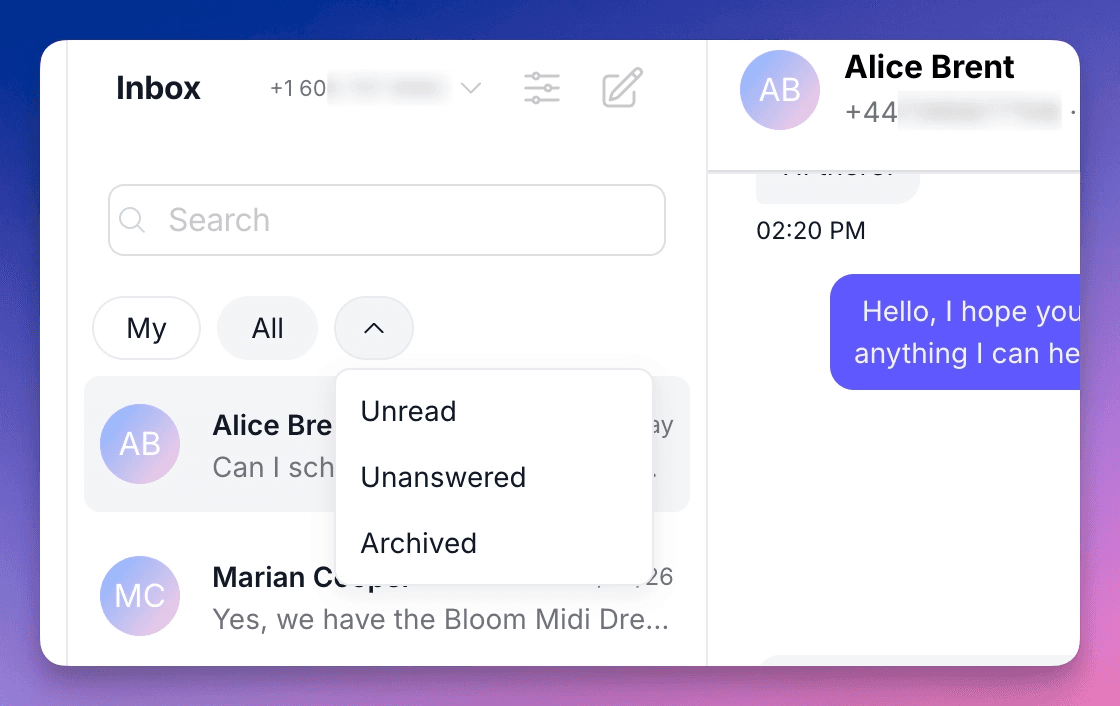
Your inbox just got a cleaner look. We’ve simplified the default view down to two tabs, My and All, so you always start with the view that matters most: your conversations, or everyone’s.
Everything else now lives behind a new dropdown selector. Click the arrow next to your tabs and you’ll find your additional filters: Unread, Unanswered, and more. This structure is designed to scale. As we add new filtering options over the coming weeks and months, they’ll appear here, keeping your default view clean no matter how powerful the filtering becomes.
Browse your archived chats
One of the most requested additions recently is here. You can now filter your inbox to show all archived conversations, making it easy to find and revisit past chats without searching for them one by one.
Just open the dropdown and select Archived, and every conversation you’ve previously archived is right there, organized and accessible. No more guessing where something went. And as always, if an archived contact writes to you again, the conversation automatically returns to your active inbox.
🔧 Other improvements
You can now disable URL previews when sending messages through the API, giving you more control over how your messages appear to customers.
The API now supports sending audio notes, opening up new possibilities for more personal, voice-based communication through your integrations.
🦺 Bug fixes
The phone selector in Broadcasts now correctly respects assigned numbers. Agents only see and can only send broadcasts from the phone numbers they have access to.
👷Coming up next
We’re continuing to improve our native HubSpot integration. More to come soon.
We are WhatsApp specialists!

Polser
Why don't we continue this conversation there?