🔄 Failed? Retry
Web & Mobile
We’ve made it easier to spot, track, and recover from failed messages, so nothing gets overlooked. Plus, your Polser labels now sync to HubSpot.
Failed messages, never invisible again
Nobody likes a message that didn’t make it. You wrote it, you sent it, and somewhere between Polser and your customer’s phone something went wrong. The frustrating truth is that this happens, often for reasons that have nothing to do with you or us. Meta may throttle a high-volume send. A number might be wrong or no longer active. A user may have blocked your business number. Meta sometimes runs experiments on their own infrastructure that affect delivery in ways that are completely opaque, even to us.
None of that is within Polser’s control. What we can control is what happens next, so we built a way to make sure failed messages are never invisible again.
Failed messages now show a clear inline warning icon in the chat inbox list.
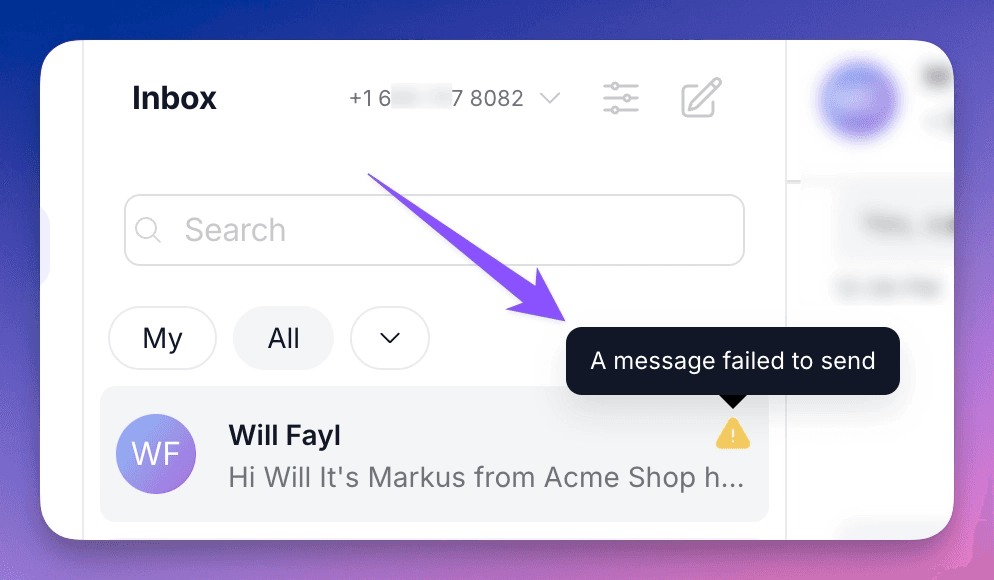
In the conversation pane, we also give you a direct link to retry when possible.
And there’s a new Failed filter in the inbox dropdown, right alongside Unread, Unanswered, and Archived, letting you pull up every affected conversation at once.

Now you can work through them one by one and watch the list clear as messages are successfully resent. (The failed message icon clears as soon as you retry or send a new message.)
Polser labels now sync to HubSpot
The labels you apply to conversations in Polser can now sync to a field in HubSpot. If you’re using labels to segment conversations, by topic, product, stage, or anything else, that context now lives in your CRM alongside everything else you know about a contact.
🔧 Other improvements
Auto-replies now wait longer and respond more intelligently before activating. This prevents duplicate auto-replies when several messages arrive in quick succession, making sure the system registers the first response before sending another.
🦺 Bug fixes
Fixed an issue where deleted knowledge resources kept appearing in Responses.
Fixed a bug where labels applied when starting a new chat weren’t being saved.
Conversations now scroll all the way to the most recent message when opened, even in a long chat history with images.
👷 Coming up next
The FAQ Responder, our first autonomous WhatsApp agent, is ready in beta. It handles customer questions automatically, outside business hours, with a human always in the loop. We’re looking for a handful of customers to activate it early and share feedback. If that sounds like you, get in touch.
We are WhatsApp specialists!

Polser
Why don't we continue this conversation there?