Read our latest release notes
Changelog
New updates and improvements to Polser.
📱 Your WhatsApp Numbers, Your Way
Renaming a WhatsApp number used to mean waiting on Meta, sometimes for days, just so your team could tell your numbers apart. And a quick reaction reply to a customer still left the chat sitting in Unanswered. This release lets you name your numbers right inside Polser, makes reactions count as answers, and tidies up a lot of small things in your inbox.
Name your numbers, no Meta approval needed

Polser used to show each number's official Meta display name when you transferred a chat, sent a broadcast or filtered your inbox. Changing that name meant waiting hours or even days for Meta's approval, and agents with several numbers often couldn't tell who was behind each one.
Now admins can give every number its own name inside Polser, ready to use straight away, with no waiting on Meta.
🙋 We've moved phone numbers from the Business profile tab to a new, dedicated tab. This is the first step toward introducing new features for numbers.
Emoji reactions count as an answer
Sometimes a 👍 is all a customer needs. Now, when an agent reacts to a customer's latest message, the chat leaves your Unanswered list, and your dashboard's Unanswered count updates to match. The chat stays where it is in your inbox, so nothing jumps around.
Label filters skip archived chats
Filtering by a label now hides archived chats, just like the rest of your inbox. Need to see them? Flip the new "Show archived" switch under the labels and they appear right in place.

Know your template before you send it

When a conversation is outside the 24-hour window, the template picker now shows whether each template is Marketing, Utility or Authentication. That helps you keep costs down and avoid Marketing templates in countries where they fail, like the US. You can also open the full text of any template before you send it, right down to the end, even when it uses variables. This works when you schedule a message or start a new chat too.
Send videos, files and reply buttons through the API and HubSpot
Inside the 24-hour window, the API and HubSpot workflows can now send videos, files, and messages with up to three reply buttons, all without a template. When a customer taps a button, you get their answer just like a template quick reply.
HubSpot activities show who sent them
WhatsApp messages logged in HubSpot are now assigned to the agent who sent them, so your CRM shows who said what. If you connected HubSpot before this release, you'll see a prompt in Settings.
🙋 Reconnect your HubSpot integration once to turn this on.
🦺 Bug fixes
The Broadcasts list now loads faster and more reliably, even for large accounts.
Unarchiving a chat now moves it out of Archived straight away, with no refresh needed.
A new customer message could briefly disappear when the inbox refreshed. It now stays on screen.
HubSpot label sync could clear a contact's label in HubSpot. Your labels now stay put.
Some sent messages were missing from HubSpot when WhatsApp skipped the "delivered" step. They're now logged every time.
👷 Coming up next
Most of these updates are coming to the iOS and Android apps soon. We're also working on a round of general improvements to make your everyday work in Polser smoother. Stay tuned.
🏷️ Labels, leveled up
Labels in Polser do a lot of jobs at once. Your team uses them to organise chats day to day, they sync with your CRM, and they power your broadcast audiences. As you've relied on them more, you've asked us for a few things. In this release, we take labels to the next level, both in how they look and how you manage them.
Highlighted Labels
Not all labels are created equal. Some of them tell your team exactly what matters about a contact: a VIP customer, an enrolled student, a lead that needs attention now.
Admins can now mark up to 5 labels as highlighted. Just open the ⋯ menu next to any label in Settings → Labels and select "Mark as highlighted".
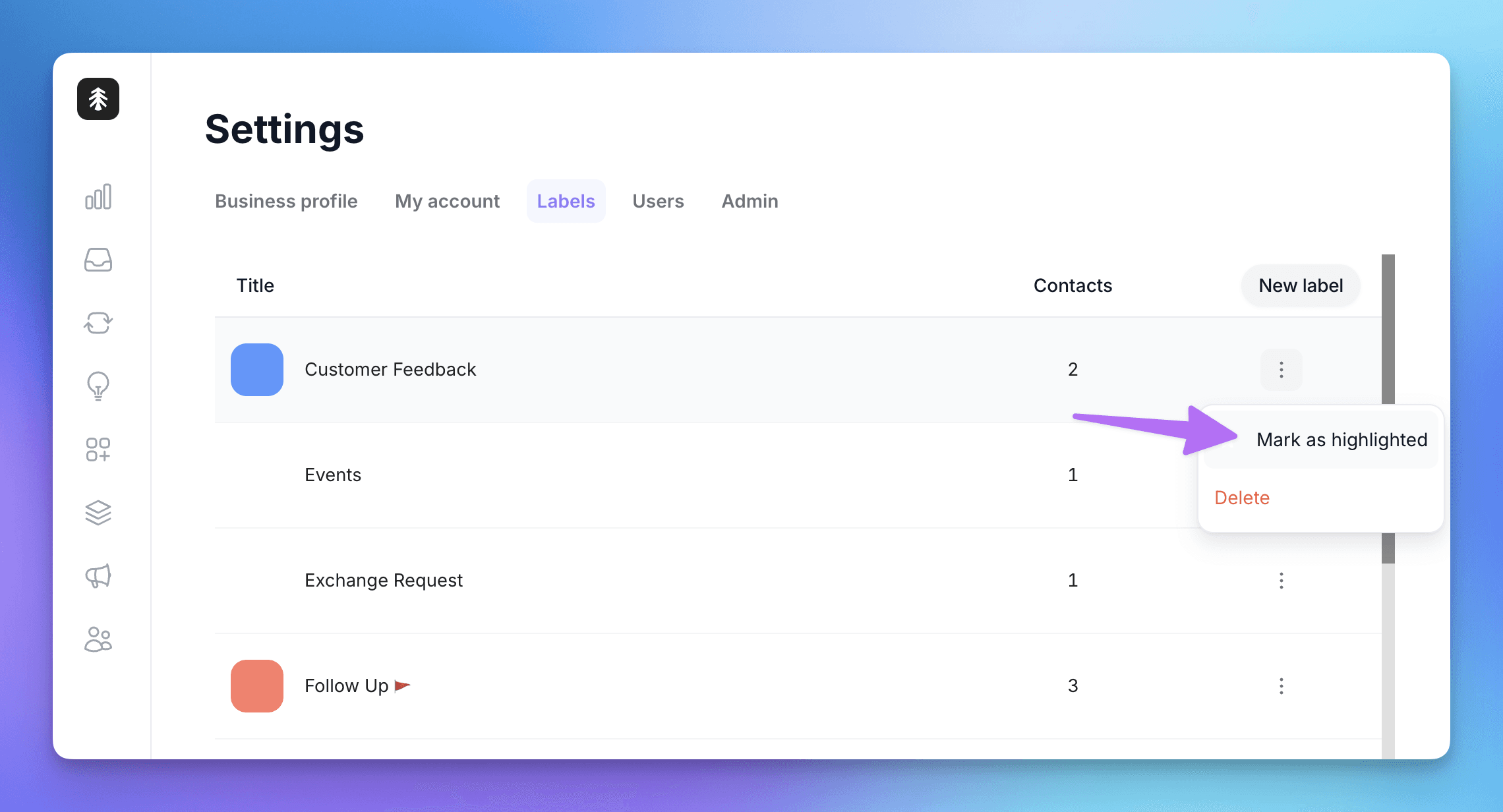
Highlighted labels then show up where your team actually works, on web and mobile:
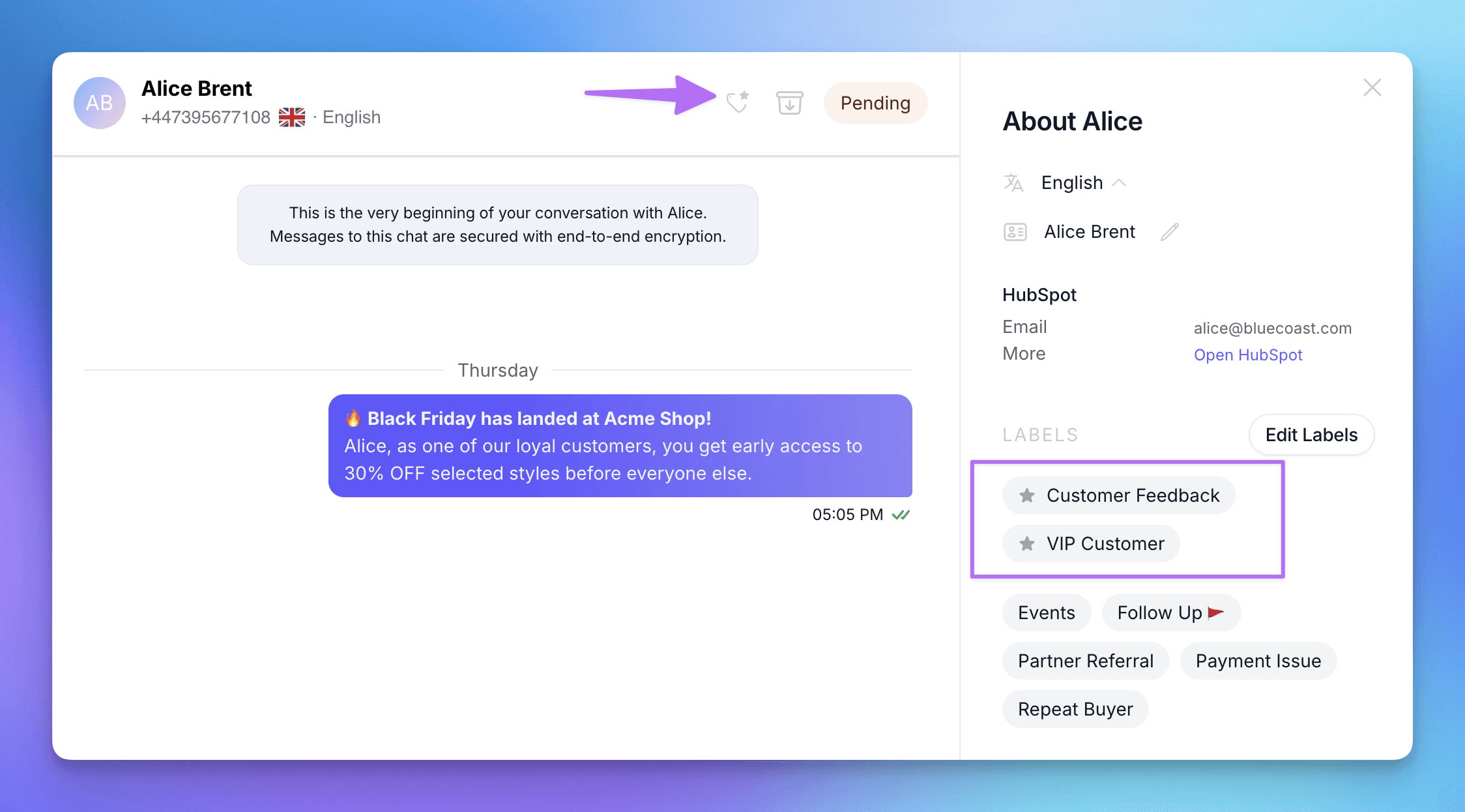
In the contact profile: highlighted labels are listed first, marked with a star, above all the others.
In the chat header: a small tag icon appears whenever the contact carries a highlighted label, so your agents know at a glance. Click it to open the contact's profile.
More colours
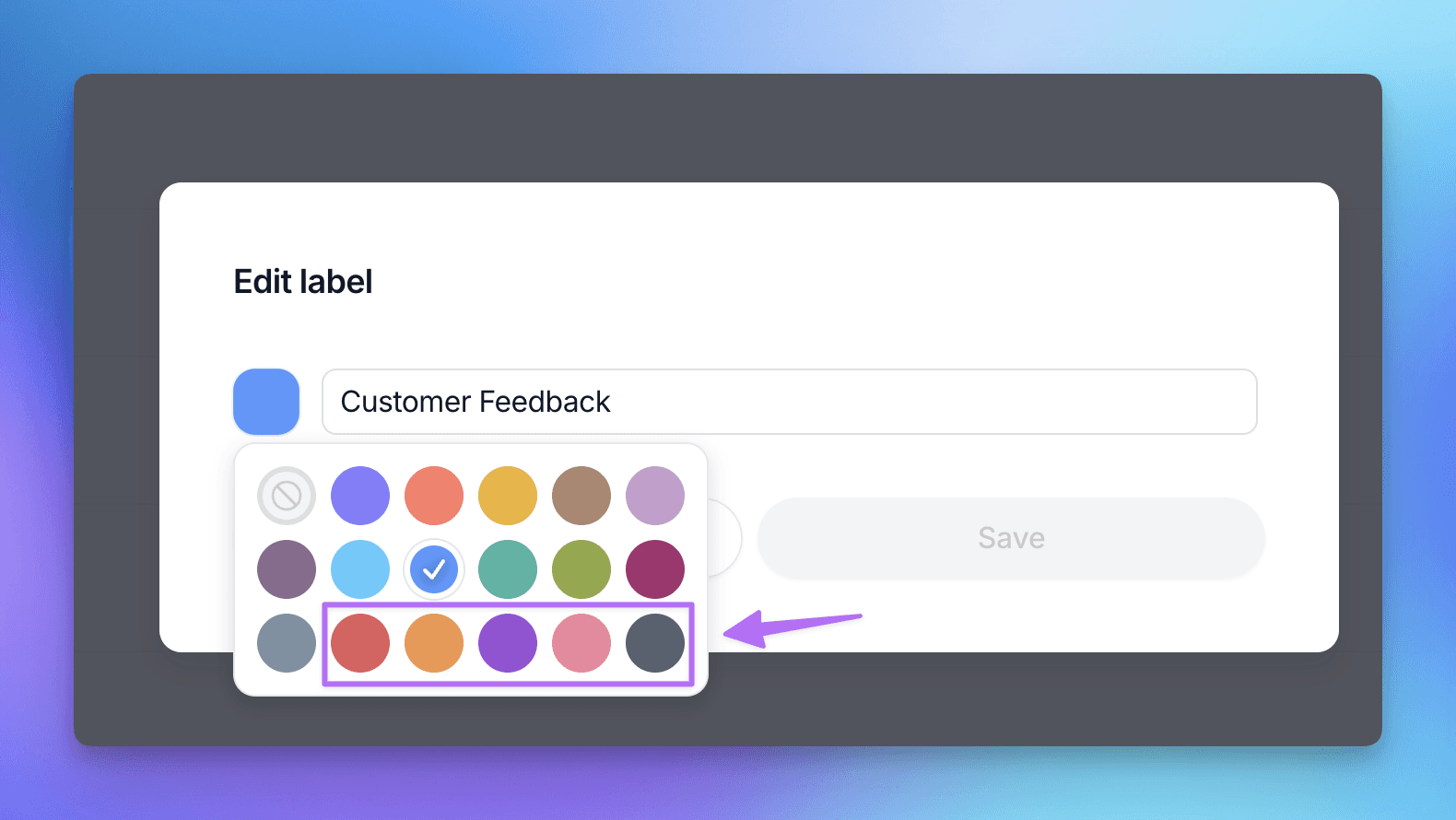
The label colour picker now has 18 colours instead of 12. We've added red, orange, violet, rose and charcoal, so every label can have a colour of its own.
Label management is now Admin-only
Since labels drive your CRM sync and your broadcast audiences, changing them should be a deliberate decision. From now on, only Admins can access Settings → Labels to create, edit, delete or highlight labels.
Team Members can still add labels to conversations, and create new ones on the fly from the chat, just like before.
Other improvements
The Public API now supports WhatsApp usernames, and we've updated the webhook documentation in the Help Center to match.
Broadcast metrics now load correctly for campaigns with very large recipient lists.
🦺 Bug fixes
Fixed an issue where messages from contacts with "@" in their WhatsApp name were sent to integrations as outgoing messages.
New team members no longer briefly see all WhatsApp numbers before being assigned one, when "assigned numbers only" is on.
Fixed an issue where buttons weren't displayed in some messages.
👷 Coming up next
We're planning some improvements to our API, working on our Help Center documentation, and polishing a few UX details here and there.
👀 Usernames, now in view
A while back we got Polser ready for WhatsApp usernames. This release is the next chapter: as Meta rolls usernames out, they now show up where you actually work. The inbox, contact profiles, your contacts list, exports, and your HubSpot sync all keep every contact recognizable, with or without a phone number.
Usernames, visible across Polser
Meta is rolling out WhatsApp usernames as an alternative to phone numbers, which means some contacts will start reaching you with a username and no phone number at all. Polser is now ready for that everywhere it counts.
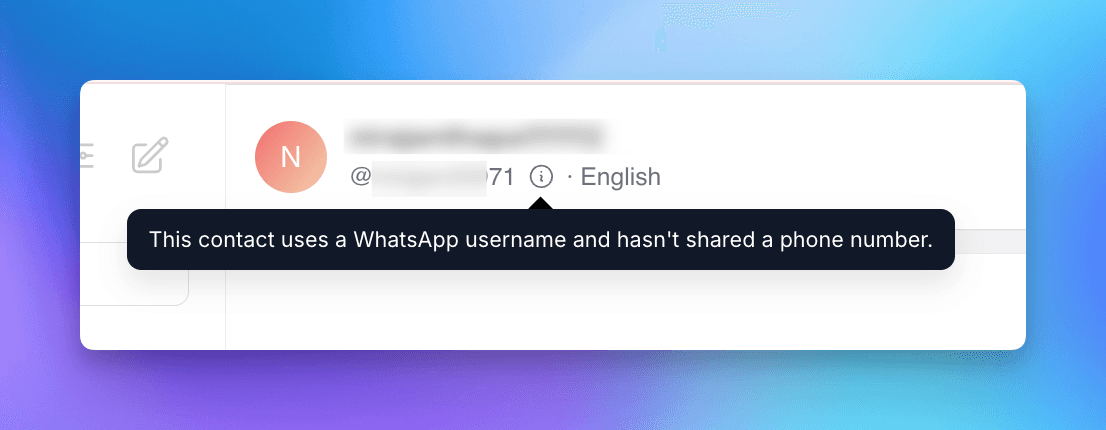
In the conversation, a contact with no phone number now shows their @username in the header. If we have neither a number nor a username, you see a clear "No phone number" label with a short explanation, never an empty space.
In the contact profile, phoneless contacts now display their BSUID (the system ID Meta assigns them), clearly marked as a masked identifier so nobody mistakes it for a real phone number.
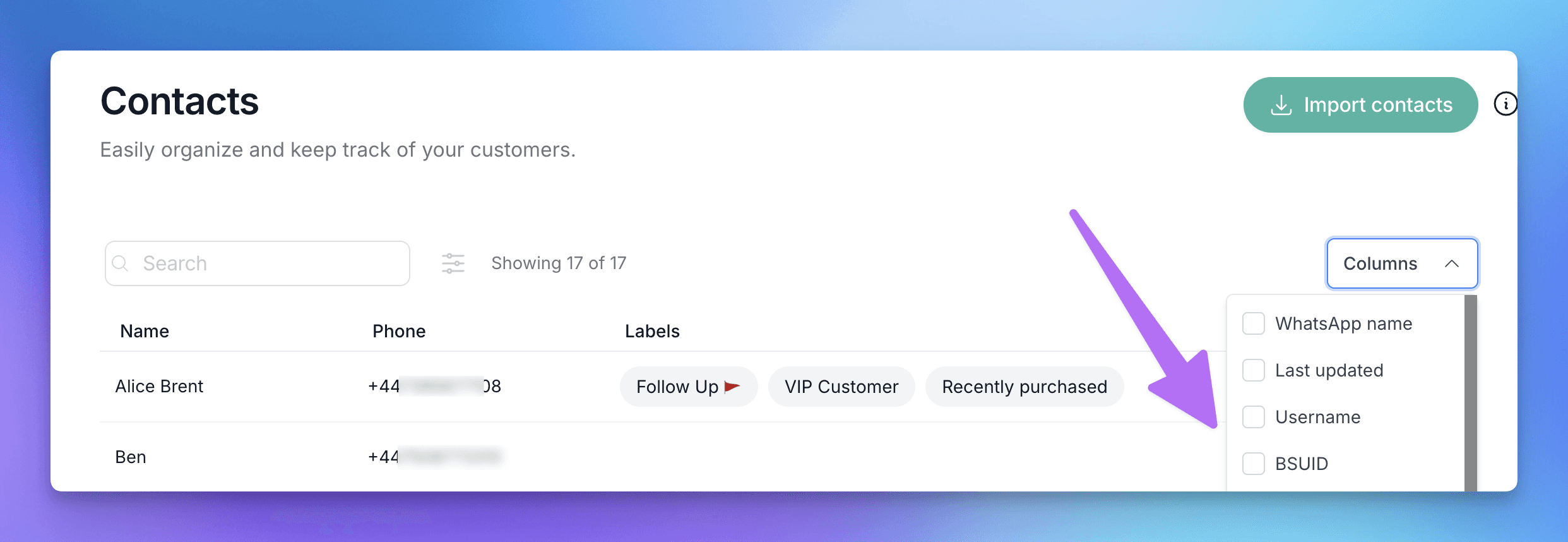
And across your contacts, you can now add Username and BSUID as columns in your list, search by either one to find someone instantly, and carry the BSUID through to your exports whenever it is available.
Usernames in your HubSpot sync
If you use our HubSpot integration, you can now map a contact's WhatsApp username and BSUID to HubSpot properties, right next to where you already map the phone number. For any contact we match by phone, their username and BSUID get written to HubSpot too. It is a small window with a real payoff: while a contact still shares both their number and their username, this links the two identities on their HubSpot record, so if they ever hide their number later, you already have the connection on file.
Send richer templates through the API
Templates that open with an image or video header can now be sent through the Polser API and through the HubSpot "Send a WhatsApp template message" action.
🦺 Bug fixes
Fixed the admin dashboard's Message Composition block failing to load on some accounts.
The Templates screen no longer shows expired conversation templates. Only your broadcast templates appear there now. As usual.
WhatsApp Flows now run correctly for contacts who have a username but no phone number.
👷 Coming up next
We plan to continuously support username-related features as Meta progressively rolls out updates.
We are WhatsApp specialists!

Polser
Why don't we continue this conversation there?